How the CAET Course Was Built All demos
Live demo 5 of 7

Process Stepper

A procedure one step at a time, with a strip that shows every step and lights the current one. Each step has what to do, the real source text and the figure of that step. Nothing is graded, and nothing moves on by itself.

From the lesson Antennas and Coax (Surveillance), page 13, "Install". Open it in the real lesson

Lesson page, as the student sees it
Antennas

Installing an Antenna

Always follow the antenna manufacturer’s instructions. The steps below are the FAA’s typical installation, with the real words of Advisory Circular (AC) 43.13-2B for each one.

WarningInstalling an antenna means drilling the skin. Check what is behind it before the drill turns: wire bundles, control cables, fuel lines and structure.

Step 1 of 6

Template

Mark the location from the installation drawing. Tape the template on the fore-and-aft centerline, then drill the mounting holes and the hole for the coax.

“Refer to installation drawing before drilling holes in aircraft skin to determine proper size and spacing.”

Source: AC 43.13-2B, par. 309b(1).
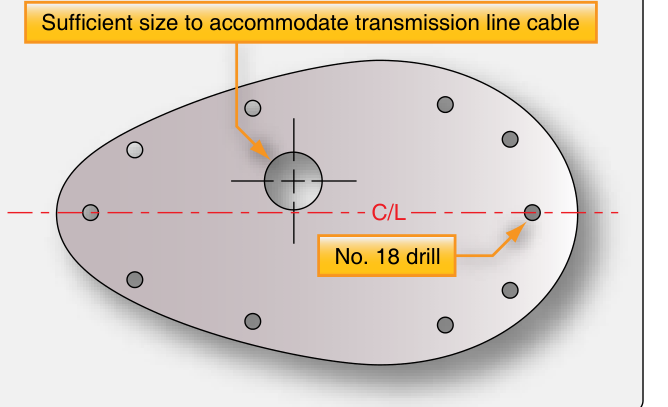
A typical antenna mounting template: a teardrop outline on the centerline with a large hole for the transmission line cable and eight holes marked No. 18 drill.
Source: FAA-H-8083-31B, Figure 11-161. Open the figure full size

Why It Teaches

A long procedure given one step at a time, at the student's own pace, beats the same procedure on one screen. That is the segmenting effect, confirmed in a 2019 meta-analysis (Rey and colleagues).

Stepping through a solved installation, with the reason for each step, is a worked example. And the 4C/ID model puts the how-to information right beside the step it governs: here, the advisory circular's own words for that step. The strip keeps the whole procedure in view, so the student always knows where they are.

When not to use it: when the student should produce the order (the stepper would give it away; the course follows a stepper with a drag-to-order on a later page), or when the steps are really a motion, which is an animation.

Principles

Craft note

How It Is Built

Each step is data: a heading, the instruction, the quote and where it is from, and the figure with its credit. The figures are FAA handbook and advisory circular figures, US government works in the public domain, credited under each one. A step with no figure shows its one key value instead, so every step still shows its state.

Next never advances on its own. The strip marks the current step with aria-current, and the step count is read out. The closing rule appears only after the last step. The stepper is a local part; three lessons carry slightly different versions.